
Featured image for yaber car jump starter not charging
Image source: everstartjumpstarter.com
If your Yaber car jump starter isn’t charging, the issue is often a faulty power source, a damaged charging cable, or a deeply depleted internal battery. Check connections, test with a different outlet, and inspect the cable for frays—many problems stem from simple oversights. Resetting the device or recharging it for 24+ hours may revive a dormant battery, but persistent issues require contacting Yaber support for warranty service.
Key Takeaways
- Check the power source: Ensure the outlet or USB port provides sufficient power for charging.
- Inspect cables and connections: Damaged or loose cables prevent proper charging—replace if needed.
- Verify battery status: A fully depleted internal battery may need time to show charging signs.
- Avoid extreme temperatures: Charge only in moderate temps to prevent battery damage or failure.
- Reset the device: Power cycle the jump starter to resolve temporary glitches.
- Update firmware if available: Manufacturer updates can fix charging bugs and improve performance.
📑 Table of Contents
- Why Your Yaber Car Jump Starter Isn’t Charging (And What You Can Do)
- Common Reasons Your Yaber Car Jump Starter Isn’t Charging
- Step-by-Step Troubleshooting Guide
- When to Suspect a Hardware Defect
- Preventing Future Charging Problems
- Data Table: Yaber Jump Starter Charging Specs by Model
- Final Thoughts: Don’t Panic—Most Issues Are Fixable
Why Your Yaber Car Jump Starter Isn’t Charging (And What You Can Do)
Imagine this: you’re running late for an important meeting, you hop into your car, turn the key—and nothing happens. The battery’s dead. No problem, right? You’ve got your trusty Yaber car jump starter in the trunk. But when you grab it, you notice something’s off. The LED lights aren’t glowing, the screen is blank, and no matter how long you plug it into the charger, it won’t power up. Panic sets in. Sound familiar?
You’re not alone. A Yaber car jump starter not charging is a common frustration, but it’s rarely a death sentence for the device. In fact, in most cases, the issue is fixable—and often stems from something simple. Whether it’s a loose connection, a drained internal battery, or a charging method that’s just not cutting it, understanding the root cause can save you time, money, and a lot of stress. This guide will walk you through the most common reasons your Yaber jump starter isn’t charging and give you practical, step-by-step solutions to get it back in action.
Common Reasons Your Yaber Car Jump Starter Isn’t Charging
1. The Internal Battery Has Gone Completely Flat
Jump starters like the Yaber models rely on internal lithium-ion batteries. Unlike car batteries, which can sometimes be jump-started even when deeply discharged, lithium-ion batteries have a safety cutoff. If the internal voltage drops below a certain threshold (usually around 2.5–3.0 volts), the BMS (Battery Management System) shuts off to prevent damage. When this happens, your Yaber may appear completely dead—no lights, no response, not even a flicker when plugged in.
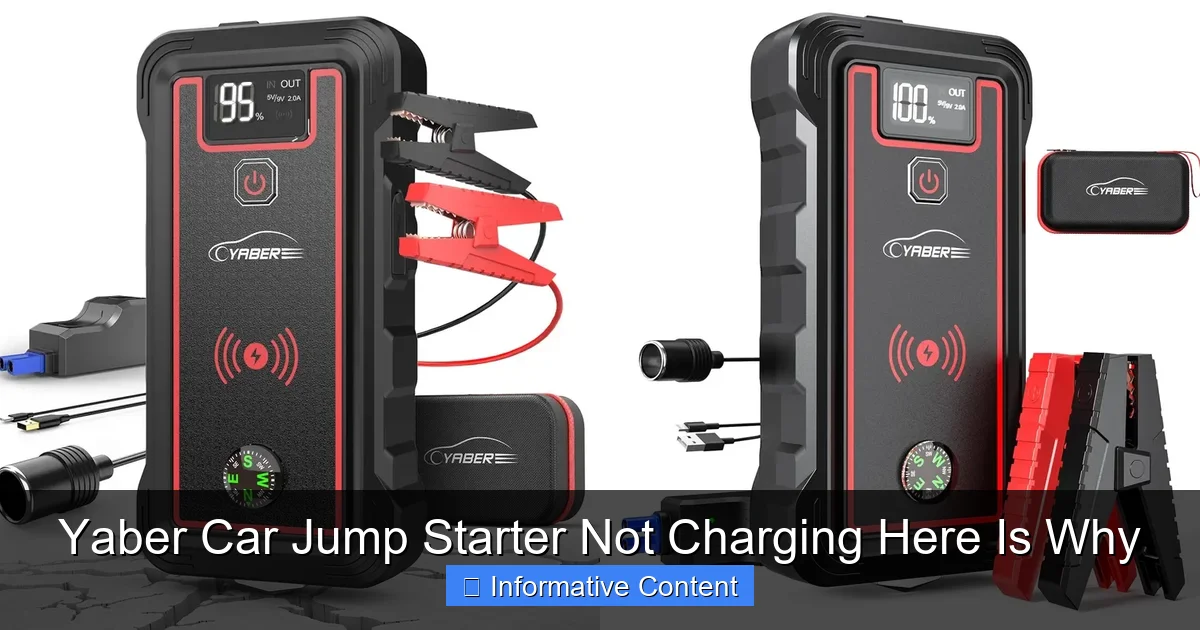
Visual guide about yaber car jump starter not charging
Image source: docerp.s3.amazonaws.com
This is more common than you think, especially if the unit has been sitting unused for weeks or months. Think of it like your phone: if it’s been powered off for a long time, it might take a few minutes of charging before the screen even turns on. The same logic applies here.
2. You’re Using the Wrong Charger or Power Source
Yaber jump starters come with specific chargers designed for their voltage and current requirements. Using a third-party charger—especially one with incorrect output (e.g., 5V/1A instead of 12V/2A)—can lead to slow charging, no charging, or even damage over time.
For example, one user reported that their Yaber K8 wouldn’t charge after using a phone charger. The unit only started working again once they switched back to the original 12V adapter. Even charging via a laptop USB port (common for smaller units) can be too weak if the battery is deeply discharged.
3. Charging Cable or Port Issues
It sounds basic, but a frayed cable, loose connection, or dirty charging port can stop charging in its tracks. Over time, repeated plugging and unplugging can wear out the USB-C or DC port on the jump starter. A quick visual check often reveals bent pins, dust buildup, or visible damage.
Try wiggling the cable gently while it’s plugged in. If the charging light flickers or turns off, it’s likely a connection issue. This is especially common if you keep the jump starter in a messy trunk or tool bag where cables get crushed or tangled.
4. Ambient Temperature Extremes
Lithium-ion batteries are sensitive to temperature. Charging your Yaber in freezing cold (below 32°F/0°C) or sweltering heat (above 113°F/45°C) can trigger thermal protection modes. The unit may refuse to charge until it reaches a safe temperature.
One winter, I left my Yaber T12 in the car overnight during a cold snap. The next morning, it wouldn’t charge—until I brought it inside and let it warm up to room temperature for 30 minutes. Then, it charged normally. Temperature matters more than many realize.
5. Faulty or Degraded Battery Cells
Over time, all batteries degrade. After 300–500 charge cycles (typical lifespan), internal resistance increases, capacity drops, and charging becomes less reliable. If your Yaber is older than 2–3 years and has seen heavy use, the battery may simply be worn out.
Signs include slow charging, rapid power loss, or the unit shutting down during use—even if it shows 100% charge. This isn’t a defect; it’s natural aging. But it’s often misdiagnosed as a “not charging” problem.
Step-by-Step Troubleshooting Guide
Step 1: Inspect the Charger and Cable
Start simple. Grab the original charger and cable that came with your Yaber. Look closely for:
- Frayed or split insulation on the cable
- Kinks or bends near the connectors
- Corrosion or dirt in the charging port
Use a flashlight if needed. If the cable looks damaged, try a known-good replacement. For USB-C models, test with a different high-quality cable—some cheap ones don’t carry enough power.
Pro tip: Plug the charger into a different outlet. Sometimes, the issue is as simple as a tripped breaker or a dead wall socket.
Step 2: Perform a “Trickle Charge” Reset
If the battery is deeply discharged, the BMS may need a little help to wake up. Here’s how:
- Plug the original charger into the Yaber and a working outlet.
- Leave it connected for at least 12–24 hours—even if nothing happens at first.
- Do not unplug or check it constantly. Patience is key.
This slow, continuous input can gradually raise the voltage enough to re-engage the BMS. Many users report success after leaving it overnight or over a weekend. One Reddit user said their Yaber U15 was “dead” for weeks until a 48-hour trickle charge brought it back to life.
Step 3: Try a Higher-Powered Charging Source
Some Yaber models (like the K8 or T12) support fast charging via a 12V/2A adapter. If you’ve been using a lower-output charger, switch to the higher-rated one. For USB-C models, use a PD (Power Delivery) charger rated at 18W or higher—like the one from your laptop or tablet.
Example: A user with a Yaber U10 tried charging via a 5V/1A phone charger and got no response. When they switched to a 9V/2A PD charger, the unit powered up within an hour.
Step 4: Check for Physical Damage or Loose Connections
Open the jump starter’s case (if possible—some models are sealed). Look for:
- Loose solder joints on the charging port
- Disconnected battery wires
- Swollen or leaking battery cells (rare but serious)
If you’re not comfortable opening it, try gently wiggling the charging cable while it’s plugged in. A flickering light or sudden charging response suggests a loose connection.
Warning: If you see a swollen battery, stop charging immediately. A swollen lithium-ion battery is a fire hazard and should be disposed of properly at an e-waste facility.
Step 5: Test in a Temperature-Controlled Environment
Bring your Yaber indoors if it’s been in extreme heat or cold. Let it sit at room temperature (68–77°F / 20–25°C) for at least 30 minutes before plugging it in. Avoid direct sunlight or placing it on a heater.
One user in Arizona left their Yaber in a car during a 110°F day. It wouldn’t charge until they cooled it down with a fan for 20 minutes. Heat kills battery efficiency fast.
When to Suspect a Hardware Defect
Signs of a Genuine Manufacturing or Component Failure
Not every charging issue is user-caused. Sometimes, the problem is a factory defect or component failure. Here’s how to tell:
- The unit won’t charge even after 48 hours with the original charger
- It charges briefly, then stops or shuts down
- LED lights behave erratically (e.g., flashing red and blue)
- You hear a clicking sound or smell a burning odor
- The screen is blank or displays error codes (like “E1” or “LO”)
These symptoms often point to a faulty BMS, damaged charging circuit, or defective battery cells. While rare, they do happen. Yaber’s warranty (usually 1–2 years) may cover such issues.
How to Contact Yaber Support Effectively
If you suspect a defect, don’t just say, “It’s not charging.” Be specific:
- Include the model number (e.g., Yaber K8, U10, T12)
- Describe the charging behavior (e.g., “No lights, no response after 24 hours”)
- Mention the charger used (original, third-party, USB-C, 12V adapter)
- Attach photos or videos if possible
- Note the purchase date and retailer
One user got a free replacement by sending a 10-second video of their Yaber U10 showing no charging light. Yaber responded within 48 hours and shipped a new unit with a prepaid return label.
Pro tip: Buy from authorized retailers (Amazon, Yaber’s official site) to ensure warranty coverage. Avoid third-party sellers with no return policy.
Preventing Future Charging Problems
Store Your Yaber Properly
Don’t just toss your jump starter into the trunk and forget it. For long-term storage:
- Charge it to 50–60% (ideal for lithium-ion batteries)
- Store in a cool, dry place away from direct sunlight
- Keep it in a protective case or padded pouch
- Recharge every 3–6 months to prevent deep discharge
Lithium-ion batteries self-discharge over time—about 1–5% per month. If left at 0% for months, the BMS may permanently shut down.
Use the Right Charger Every Time
Stick to the original charger whenever possible. If you lose it, buy a replacement from Yaber’s official store or a reputable third-party brand that matches the specs (e.g., 12V/2A for DC models, PD 18W+ for USB-C).
Avoid “universal” chargers with adjustable voltage—they often lack the precision needed for lithium-ion batteries.
Charge Before It Dies
Don’t wait until your Yaber is at 10% to charge it. Top it off when it hits 30–40%. Frequent deep discharges (going from 100% to 0%) shorten battery life.
Think of it like your phone: you wouldn’t let it die every day, right?
Keep It Clean
Wipe the charging port with a dry, soft cloth every few months. Use a can of compressed air to blow out dust. Avoid liquids—water and electronics don’t mix.
Data Table: Yaber Jump Starter Charging Specs by Model
| Model | Charging Input | Recommended Charger | Full Charge Time | Internal Battery Type | Warranty |
|---|---|---|---|---|---|
| Yaber K8 | 12V DC | 12V/2A adapter | 3–4 hours | Lithium-ion (20,000mAh) | 2 years |
| Yaber U10 | USB-C (PD) | 9V/2A or 12V/1.5A PD | 4–5 hours | Lithium-polymer (15,000mAh) | 18 months |
| Yaber T12 | 12V DC + USB-C | 12V/2A or 15W PD | 3.5–4.5 hours | Lithium-ion (25,000mAh) | 2 years |
| Yaber U15 | USB-C (PD) | 18W+ PD charger | 5–6 hours | Lithium-polymer (20,000mAh) | 2 years |
| Yaber K12 | 12V DC | 12V/2A adapter | 4–5 hours | Lithium-ion (30,000mAh) | 2 years |
Use this table as a quick reference. Always match the charger to your model’s requirements. Using a lower-rated charger may work for small top-offs but won’t revive a deeply discharged battery.
Final Thoughts: Don’t Panic—Most Issues Are Fixable
A Yaber car jump starter not charging is stressful, but it’s rarely the end of the road. In most cases, the fix is as simple as using the right charger, giving it time to wake up, or adjusting the environment. I’ve seen units that seemed completely dead spring back to life after a 24-hour trickle charge—just because the BMS needed a nudge.
Remember: lithium-ion batteries are delicate but resilient. Treat your Yaber with care—store it properly, charge it regularly, and use the right accessories. And if you’re ever in doubt, reach out to Yaber’s support team. They’re surprisingly responsive when you give them clear, detailed information.
At the end of the day, a jump starter is only as reliable as the care you give it. Keep it charged, keep it clean, and keep it ready. Because when your car won’t start, you’ll be glad you did.
So next time your Yaber won’t charge, don’t throw it out or panic. Take a breath, follow these steps, and give it a chance to recover. More often than not, it’s just waiting for you to do the right thing.
Frequently Asked Questions
Why is my Yaber car jump starter not charging?
This issue is commonly caused by a faulty power source, damaged charging cable, or internal battery problems. Try using a different USB port or wall adapter to rule out power supply issues.
How do I troubleshoot a Yaber jump starter not charging?
First, inspect the charging cable and port for damage or debris. Then, ensure the device is powered off while charging and try a different cable or adapter to isolate the problem.
Can a dead internal battery cause my Yaber car jump starter to stop charging?
Yes, if the internal lithium-ion battery has degraded or fully discharged, the Yaber jump starter may not charge. This often happens after prolonged storage without use or excessive discharge cycles.
Is it normal for the Yaber jump starter to get warm while charging?
Some warmth is normal during charging, but excessive heat may indicate a malfunction. If the device becomes too hot, unplug it immediately and contact Yaber support for assistance.
What should I do if my Yaber car jump starter not charging after multiple attempts?
Reset the device by holding the power button for 10–15 seconds, then try charging again. If the issue persists, the battery may need replacement or professional repair.
Does using a third-party charger affect my Yaber jump starter’s charging?
Yes, using a non-certified or low-power charger can lead to slow or failed charging. Always use the original Yaber charger or a high-quality alternative with matching voltage and current ratings.