
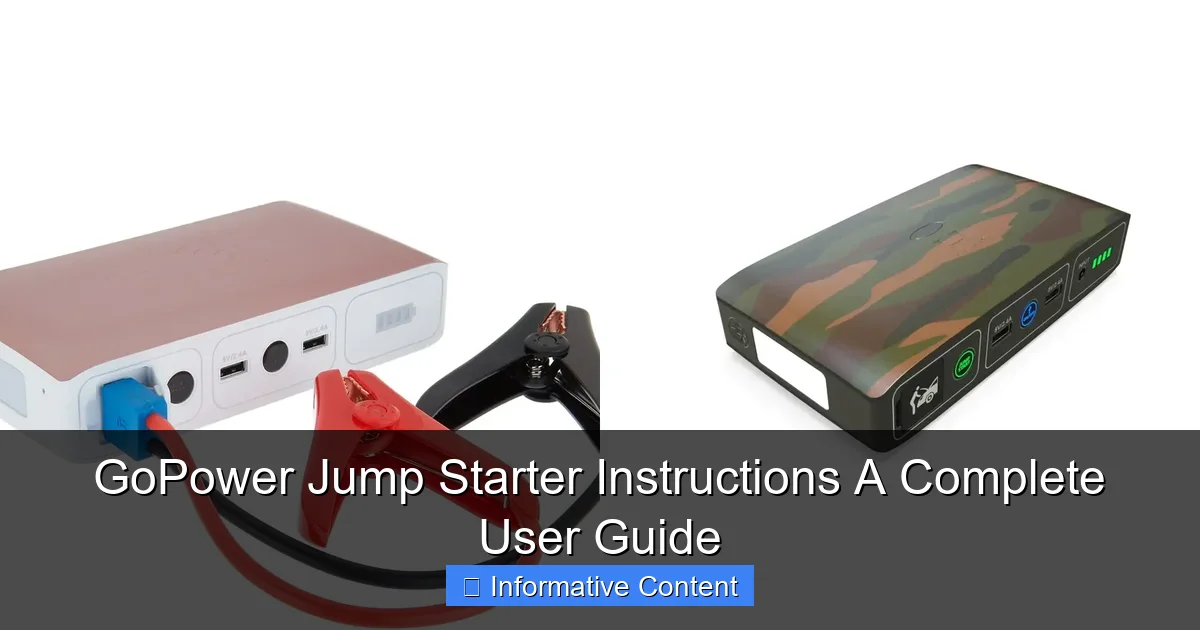
Featured image for gopower jump starter instructions
Image source: docerp.s3.amazonaws.com
Master your GoPower jump starter with these clear, step-by-step instructions to safely jump-start your vehicle, charge devices, and maximize battery life. Always follow the LED indicator guide and safety precautions to avoid damage and ensure reliable performance in emergencies.
Key Takeaways
- Always charge fully before first use for optimal performance.
- Check clamps for damage to ensure safe, reliable connections.
- Follow polarity—connect red to positive, black to negative.
- Wait 30 seconds after connecting before attempting to start.
- Store in cool, dry place to prolong battery life.
- Use safety mode to prevent sparks and reverse polarity.
📑 Table of Contents
- Why Every Driver Needs a GoPower Jump Starter
- Getting to Know Your GoPower Jump Starter
- Step-by-Step GoPower Jump Starter Instructions
- Advanced Features and Multi-Use Functions
- Maintenance and Care for Long-Term Reliability
- Troubleshooting Common Issues
- Final Thoughts: Your GoPower Jump Starter Is a Lifesaver
Why Every Driver Needs a GoPower Jump Starter
Imagine this: It’s a cold winter morning, you’re running late for work, and as you turn the key in your car, all you hear is a faint click… and silence. Your car battery is dead. Again. You call for help, wait for a tow truck, or worse—cancel your plans. Sound familiar? If so, you’re not alone. Dead batteries happen to the best of us, and they rarely strike at a convenient time. That’s where the GoPower Jump Starter comes in—a compact, reliable, and powerful tool designed to get you back on the road in minutes, without relying on another vehicle or roadside assistance.
Unlike traditional jumper cables that require a second car, the GoPower Jump Starter is a standalone device with a built-in battery. It’s like carrying a personal mechanic in your glovebox. Whether you’re stuck in a grocery store parking lot, on a remote trail, or just at home in your driveway, this little powerhouse can deliver a jump-start in seconds. But owning it isn’t enough—knowing how to use it safely and effectively is what separates a quick fix from a potential hazard. That’s why I’ve put together this complete user guide to GoPower Jump Starter instructions. From setup to troubleshooting, I’ll walk you through everything you need to know—based on real-world use, common mistakes, and expert tips.
Getting to Know Your GoPower Jump Starter
Before you even think about jumping a car, it’s essential to understand what you’re working with. The GoPower Jump Starter isn’t just a battery pack; it’s a multifunctional emergency tool. Most models come with features like LED flashlights, USB ports for charging phones, and even air compressors in some versions. But let’s start with the basics.
Visual guide about gopower jump starter instructions
Image source: cdn.shopify.com
What’s in the Box?
When you first unbox your GoPower Jump Starter, you’ll typically find:
- The main jump starter unit (with built-in battery)
- Smart jumper cables with clamps (often labeled red for positive, black for negative)
- A wall charger for recharging the unit
- A car charger (for recharging on the go)
- A user manual (keep this handy!)
- Optional: Air compressor hose, phone charging cables, or carrying case
Tip: Always check the manual for your specific model—features vary. For example, the GoPower GP-2500 has a 2500A peak current, while the GP-1500 is rated at 1500A. Higher amperage means it can jump larger engines, like trucks or SUVs.
Key Features and Specifications
Here’s a breakdown of what makes the GoPower Jump Starter stand out:
- Peak Current: Ranges from 1000A to 3000A depending on model—enough to start most 12V gasoline and diesel engines
- Battery Capacity: Typically 18,000mAh to 25,000mAh—enough for 20+ jump starts on a single charge
- USB Ports: 1–2 ports for charging smartphones, tablets, or GPS units
- LED Light: High-lumen flashlight with SOS and strobe modes
- Safety Protection: Reverse polarity, over-current, over-voltage, and short-circuit protection
- Weight: Usually between 1.5 to 3 pounds—light enough to carry, heavy enough to feel durable
One thing I love is the smart clamp technology. Unlike old-school cables, GoPower’s clamps have built-in sensors that detect if you’ve connected them incorrectly. If you hook up the red to negative by mistake, the unit will beep and flash a warning—saving your battery (and your nerves).
First-Time Setup and Charging
Before your first use, charge the GoPower Jump Starter fully. This isn’t just a recommendation—it’s critical.
- Use the included wall charger and plug it into a standard outlet.
- Connect the charging cable to the unit’s input port (usually labeled “DC IN”).
- Charge for at least 4–6 hours. Most models have an LED indicator that turns green when fully charged.
Pro tip: Don’t skip the initial charge. A new unit might show partial charge, but full capacity ensures reliable performance when you need it most. I once tried to jump a friend’s truck with a unit that was only 70% charged—it worked, but barely. After that, I always keep mine at 100%.
Step-by-Step GoPower Jump Starter Instructions
Now that your unit is charged, it’s time to learn how to use it. The process is simple, but following the correct order is crucial for safety and success. Think of it like baking a cake—wrong steps, bad results.
Step 1: Safety First – Prepare the Vehicle
Before touching any cables or terminals, take these precautions:
- Park the vehicle on a flat, dry surface. Turn off the ignition and remove the key.
- Engage the parking brake. If it’s a manual transmission, put it in neutral.
- Wear gloves if available—battery terminals can corrode and cause skin irritation.
- Inspect the battery. Look for cracks, leaks, or severe corrosion. If the battery is damaged, do not attempt a jump—call a professional.
Real-life example: Last summer, I tried to jump a car with a cracked battery case. The GoPower unit worked, but the battery sparked and leaked acid. We had to stop immediately. Safety isn’t optional.
Step 2: Connect the Jumper Cables
This is where the GoPower Jump Starter instructions really shine. Follow this sequence:
- Turn on the GoPower unit by pressing the power button. You’ll hear a beep and see the LED screen light up.
- Take the red (positive) clamp and attach it to the positive terminal on the car battery. It’s usually marked with a “+” and is the larger of the two posts.
- Take the black (negative) clamp and attach it to an unpainted metal surface—like a bolt on the engine block or the car’s frame. Never connect it directly to the battery’s negative terminal if you can avoid it. This reduces the risk of sparks near the battery.
Why the engine block? It’s a safe ground point. The negative terminal can sometimes release hydrogen gas, and a spark could ignite it. Using the engine block as ground is a standard safety practice.
Step 3: Start the Engine
Once both clamps are securely attached:
- Get into the driver’s seat and turn the key to the “on” position. You should see dashboard lights.
- Wait 3–5 seconds. This allows the GoPower unit to stabilize and deliver consistent power.
- Turn the key to start the engine. If it cranks but doesn’t start, wait 10 seconds and try again.
Tip: If the engine doesn’t start on the first try, don’t panic. Wait a full minute before retrying. Continuous cranking can overheat the starter motor. The GoPower unit also has a “boost” button on some models—press it to deliver extra current.
Step 4: Disconnect and Recharge
Once the engine is running:
- Remove the black (negative) clamp first, then the red (positive) clamp.
- Turn off the GoPower unit.
- Reconnect the clamps to the unit’s storage ports to prevent loss.
- Let the car run for at least 15–20 minutes to recharge its battery.
Important: Always disconnect in reverse order of connection. Removing the positive first can create a short circuit if the negative clamp accidentally touches metal.
After use, recharge the GoPower unit within 24 hours. Lithium-ion batteries degrade faster when left discharged.
Advanced Features and Multi-Use Functions
The GoPower Jump Starter is more than just a jumper—it’s a survival tool for modern drivers. Let’s explore its other capabilities.
USB Charging for Devices
Stuck in a dead car with a dead phone? No problem. The GoPower unit has 1–2 USB ports (usually 5V/2.1A) perfect for charging:
- Smartphones (iPhone, Android)
- Tablets
- GPS units
- Bluetooth headphones
How to use: Plug your device’s charging cable into the USB port. The unit will automatically detect and start charging. Some models have a “QC 3.0” port for faster charging—look for a blue or lightning-bolt symbol.
Pro tip: Use a short, high-quality cable. Long or cheap cables can reduce charging speed or damage the unit.
LED Flashlight and Emergency Modes
Most GoPower models include a powerful LED flashlight with three modes:
- Standard: Bright white light for visibility
- Strobe: Flashing light to signal for help
- SOS: Morse code pattern (··· — ···) for emergencies
To activate, press and hold the flashlight button for 2 seconds. Tap to cycle through modes.
Real-life use: Last winter, I got stranded on a rural road at night. I used the SOS mode to flag down a passing truck. The driver said the flashing light was visible from over a mile away—definitely a lifesaver.
Air Compressor (Select Models Only)
Some GoPower units (like the GP-3000) include a built-in air compressor. It’s great for:
- Inflating car tires after a slow leak
- Topping up bike tires
- Air mattresses or sports equipment
How to use: Attach the hose to the tire valve, press the “Inflate” button, and set the desired PSI using the digital display. The unit will shut off automatically when the target is reached.
Note: The compressor is not meant for heavy-duty use. It takes about 4–5 minutes to inflate a standard car tire from 20 PSI to 35 PSI.
Maintenance and Care for Long-Term Reliability
Your GoPower Jump Starter is an investment. With proper care, it can last 3–5 years or more. Here’s how to keep it in top shape.
Charging and Storage
- Recharge the unit every 3–6 months, even if not used. Lithium batteries lose charge over time.
- Store in a cool, dry place (ideally between 32°F and 77°F). Avoid leaving it in a hot car—temperatures above 100°F can damage the battery.
- Keep the clamps clean. Wipe them with a dry cloth after use to prevent corrosion.
Tip: If you’re storing it long-term, charge it to 50% first. Fully charged or fully drained batteries degrade faster in storage.
Inspecting for Damage
Before each use, check for:
- Cracks or leaks in the unit
- Frayed or exposed wires on the cables
- Loose clamps
- Corrosion on the clamps (clean with baking soda and water if needed)
If you see any damage, do not use the unit. Contact GoPower support or replace it. A faulty jump starter can damage your car’s electrical system.
Firmware Updates (Yes, Really!)
Some newer GoPower models have micro-USB ports for firmware updates. These updates can improve performance, fix bugs, or add new features. Check the manufacturer’s website every 6–12 months for updates.
How to update: Download the firmware, connect the unit to a computer via USB, and follow the on-screen instructions. It takes about 5–10 minutes.
Troubleshooting Common Issues
Even the best tools can have hiccups. Here’s how to solve the most common GoPower Jump Starter problems.
Unit Won’t Turn On
- Cause: Battery is fully discharged.
- Solution: Charge for at least 4 hours. If it still doesn’t work, try a different charger or outlet.
- Cause: Faulty power button.
- Solution: Press and hold for 5 seconds. If unresponsive, contact support.
Engine Cranks but Won’t Start
- Cause: Weak battery or poor connection.
- Solution: Check clamp connections. Ensure they’re tight and on clean metal. Try the “boost” button if available.
- Cause: Fuel or ignition issue.
- Solution: The jump starter only helps with the battery. If the engine cranks slowly, the problem might be fuel, spark, or compression. Call a mechanic.
Clamps Beep and Flash
- Cause: Reverse polarity (red to negative, black to positive).
- Solution: Disconnect and reconnect correctly. The unit’s safety system prevents damage, but it won’t jump until fixed.
USB Port Not Charging
- Cause: Port is dirty or cable is faulty.
- Solution: Clean the port with a dry toothbrush. Try a different cable.
- Cause: Unit is in low-power mode.
- Solution: Press the power button to wake it up.
Performance Data Table
| Issue | Likely Cause | Quick Fix | When to Call Support |
|---|---|---|---|
| Unit won’t turn on | Discharged battery | Charge for 4+ hours | After 8 hours of charging |
| Engine won’t start | Loose clamps | Re-tighten clamps | After 3 failed attempts |
| Clamps beeping | Reverse polarity | Swap clamp positions | If beeping persists after correct connection |
| USB not working | Dirty port | Clean with toothbrush | After cleaning and trying 2 cables |
| LED light dim | Low battery | Recharge unit | If dim after full charge |
Final Thoughts: Your GoPower Jump Starter Is a Lifesaver
After using my GoPower Jump Starter for over two years—and helping jump-start everything from a Prius to a Ford F-150—I can confidently say it’s one of the most practical tools I own. It’s saved me time, money, and stress more times than I can count. But like any tool, it’s only as good as the person using it. That’s why understanding the GoPower Jump Starter instructions isn’t just helpful—it’s essential.
Remember: Always charge it, store it properly, and follow the step-by-step process every time. Don’t rush the connections. Don’t skip the safety checks. And never, ever connect the clamps to the wrong terminals—even if you’re in a hurry. The smart clamps help, but they’re not foolproof.
Beyond jump-starting, this device has become my go-to for roadside emergencies. Whether it’s charging my phone during a long trip, using the flashlight during a power outage, or topping up a flat tire, the GoPower unit delivers. It’s compact, reliable, and surprisingly powerful for its size.
If you’re on the fence about buying one—don’t be. The peace of mind alone is worth it. And once you’ve used it successfully, you’ll wonder how you ever lived without it. Just keep this guide handy. Tape it to the unit, save it on your phone, or print it out. Because when you’re stuck in a dark parking lot at 10 p.m., you’ll be glad you did.
Drive safe, stay prepared, and never let a dead battery ruin your day again.
Frequently Asked Questions
How do I use the GoPower Jump Starter to jump-start my car?
To use the GoPower Jump Starter, first ensure the device is charged. Connect the red clamp to your car battery’s positive terminal and the black clamp to a grounded metal surface, then turn on the jump starter and start your vehicle.
How long does it take to fully charge the GoPower Jump Starter?
The GoPower Jump Starter typically takes 3–5 hours to fully charge using the included AC or DC adapter. A full charge provides multiple jump-starts, depending on battery capacity and vehicle size.
Can the GoPower Jump Starter be used on all vehicle types?
Yes, the GoPower Jump Starter is compatible with most 12V vehicles, including cars, trucks, motorcycles, and boats. Always check your vehicle’s manual to confirm voltage requirements before use.
What safety features does the GoPower Jump Starter include?
The GoPower Jump Starter features reverse polarity, over-current, and short-circuit protection to prevent damage to your vehicle or device. These safeguards make the jump starter safe for beginners and experienced users alike.
How do I maintain my GoPower Jump Starter for long-term use?
Store the GoPower Jump Starter in a cool, dry place and recharge it every 3–6 months to maintain battery health. Avoid exposing it to extreme temperatures or moisture for prolonged periods.
What should I do if the GoPower Jump Starter doesn’t power on?
If your GoPower Jump Starter doesn’t power on, ensure it’s fully charged and check the battery level indicator. If the issue persists, contact customer support for troubleshooting or warranty assistance.