
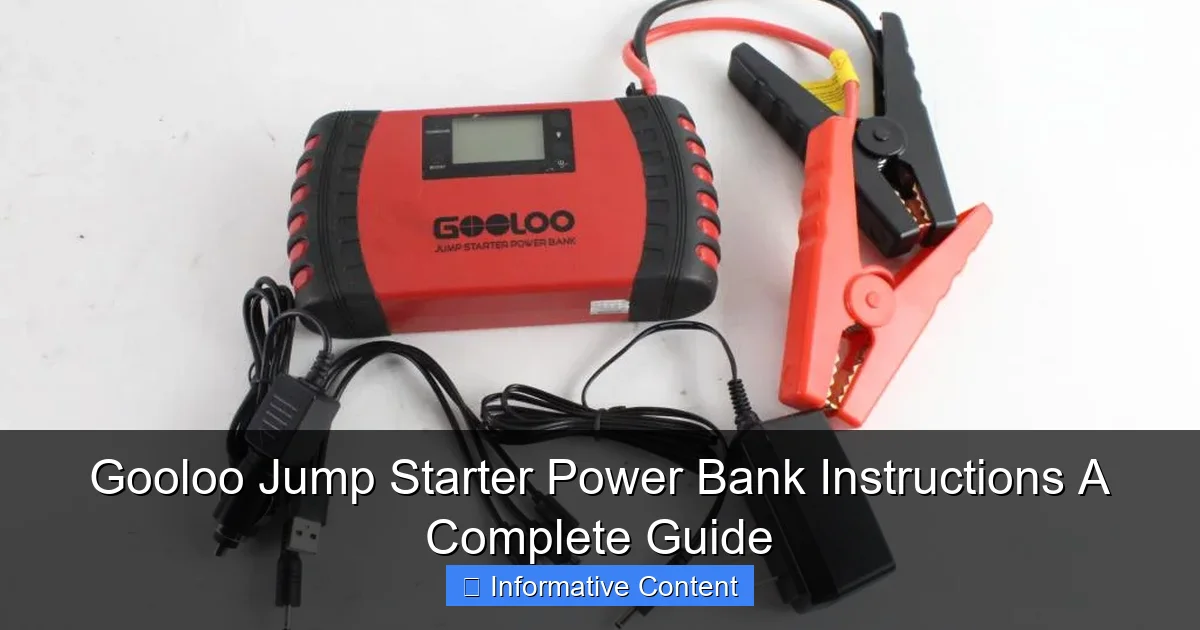
Featured image for gooloo jump starter power bank instructions
Image source: content.propertyroom.com
Master your Gooloo jump starter power bank with these simple, step-by-step instructions to safely jump-start vehicles, charge devices, and maximize battery life. From powering up to emergency mode activation, this guide ensures reliable performance every time.
Key Takeaways
- Always charge fully before first use to maximize performance and battery life.
- Use correct clamps—red to positive (+), black to negative (−) for safe jumps.
- Check LED indicators to monitor power levels and charging status quickly.
- Turn off after use to prevent accidental discharge and extend battery longevity.
- Store in cool, dry place to maintain optimal function and prevent damage.
- Test monthly to ensure reliability during emergencies or unexpected power needs.
📑 Table of Contents
- Why You Need a Reliable Jump Starter (And How Gooloo Fits the Bill)
- Understanding Your Gooloo Jump Starter Power Bank
- Step-by-Step Gooloo Jump Starter Power Bank Instructions
- Using the Power Bank and Other Features
- Maintenance and Troubleshooting
- Advanced Tips and Safety Precautions
- Final Thoughts: Why the Gooloo Jump Starter Is a Must-Have
Why You Need a Reliable Jump Starter (And How Gooloo Fits the Bill)
Imagine this: you’re running late for work, your car won’t start, and the battery is stone-cold dead. You call a friend, but they’re busy. You wait for roadside assistance, but it’s going to take an hour. Sound familiar? It’s a scenario most drivers dread—but it doesn’t have to be. That’s where the Gooloo jump starter power bank comes in. It’s a compact, all-in-one device that can jump-start your car, charge your phone, and even power small electronics. No more waiting, no more stress.
But here’s the catch: like any tool, the Gooloo jump starter is only as good as your ability to use it. Missteps—like connecting the clamps backward or letting the battery drain completely—can render it useless when you need it most. That’s why understanding the Gooloo jump starter power bank instructions isn’t just helpful; it’s essential. In this guide, I’ll walk you through everything you need to know, from setup to troubleshooting, so you can handle any roadside emergency with confidence.
Understanding Your Gooloo Jump Starter Power Bank
Before we dive into the nitty-gritty, let’s get familiar with what you’re working with. The Gooloo jump starter power bank is more than just a battery—it’s a multi-functional tool designed to keep you moving. Here’s what makes it stand out.
Visual guide about gooloo jump starter power bank instructions
Image source: content.propertyroom.com
What’s in the Box?
When you unbox your Gooloo jump starter, you’ll typically find:
- The main jump starter unit (with built-in lithium-ion battery)
- Heavy-duty jumper cables with clamps
- USB charging cables (for phones, tablets, etc.)
- AC wall adapter and 12V car charger
- User manual (yes, read it!)
- Carrying case (on higher-end models)
Pro tip: Double-check the contents right away. If anything’s missing, contact Gooloo support before you need it in an emergency.
Key Features and Specifications
Not all Gooloo models are the same, but most share these core features:
- Peak Current: Ranges from 1,000A to 3,000A (enough for most cars, SUVs, and even small trucks)
- Battery Capacity: 12,000mAh to 20,000mAh (enough for 10–30 jump starts on a full charge)
- USB Ports: 2–3 ports (5V/2.1A or 5V/3A for fast charging)
- LED Flashlight: With SOS and strobe modes for emergencies
- Safety Protections: Over-current, short-circuit, reverse polarity, and over-temperature protection
Real-world example: I once used my Gooloo GT4000 (2,000A peak) to jump-start my friend’s SUV with a dead battery. It worked on the first try—no sparks, no drama.
Common Models Compared
Here’s a quick comparison of popular Gooloo models to help you pick the right one:
| Model | Peak Current | Battery Capacity | USB Ports | Best For |
|---|---|---|---|---|
| Gooloo GT4000 | 2,000A | 18,000mAh | 2 (5V/3A) | Most cars and SUVs |
| Gooloo GP3000 | 3,000A | 20,000mAh | 3 (5V/3A) | Large vehicles, frequent use |
| Gooloo GT1500 | 1,500A | 12,000mAh | 2 (5V/2.1A) | Compact cars, occasional use |
Note: Higher peak current = better for larger engines. But if you drive a compact car, the GT1500 might be all you need.
Step-by-Step Gooloo Jump Starter Power Bank Instructions
Now that you know what you’re working with, let’s walk through how to use your Gooloo jump starter safely and effectively. These steps apply to most models, but always refer to your specific user manual for quirks.
Step 1: Charge Your Jump Starter Fully
Before your first use—and after every few uses—plug your Gooloo into the wall or car charger. Most models take 3–5 hours to charge fully. Look for the LED indicator: a solid green light means it’s ready.
- Tip: Keep it charged at all times. A dead jump starter won’t help you jump-start your car!
- Pro tip: Charge it overnight before a road trip. Better safe than sorry.
Step 2: Prepare Your Vehicle
Park your car on a flat surface, turn off the ignition, and engage the parking brake. Pop the hood and locate the battery (usually in the front). Clean any corrosion from the terminals with a wire brush if needed.
- Safety note: Never jump-start a frozen or leaking battery. Replace it first.
Step 3: Connect the Jumper Cables
Here’s the crucial part: connect the clamps in this order:
- Attach the red (+) clamp to the positive terminal on your car battery.
- Attach the black (-) clamp to a bare metal part of the engine block (not the negative terminal). This grounds the system and reduces sparking.
- Double-check the connections. The Gooloo has reverse polarity protection, but it’s better to avoid mistakes.
Real-life story: I once connected the black clamp to the negative terminal by mistake. The Gooloo’s protection kicked in—no damage, but the jump didn’t work. Lesson learned!
Step 4: Start the Engine
Press the power button on your Gooloo (hold for 2–3 seconds). You’ll hear a beep, and the LED will light up. Wait 30 seconds, then try starting your car.
- If the car starts: Great! Let it run for 5–10 minutes to charge the battery.
- If it doesn’t start: Wait 2 minutes (to protect the Gooloo’s battery), then try again. Up to 3 attempts are safe.
Pro tip: Turn off all electronics (AC, radio, lights) before starting. This reduces the load on the battery.
Step 5: Disconnect and Store
Once your car is running:
- Disconnect the black (-) clamp first.
- Disconnect the red (+) clamp.
- Turn off the Gooloo (if it doesn’t auto-shutoff).
- Recharge it as soon as possible.
Important: Never leave the clamps connected while the car is running. It can damage your vehicle’s electrical system.
Using the Power Bank and Other Features
Your Gooloo isn’t just a jump starter—it’s a portable power hub. Let’s explore how to get the most out of its other features.
Charging Your Devices
Most Gooloo models have 2–3 USB ports. To charge your phone, tablet, or GPS:
- Turn on the Gooloo (press the power button).
- Plug in your device using the included USB cable (or your own).
- Monitor the charge level via the LED indicator.
- Tip: Use a high-quality cable. Cheap cables can slow down charging.
- Pro tip: Charge power-hungry devices first (like a tablet) to maximize efficiency.
Using the LED Flashlight
The built-in flashlight is a lifesaver in low-light emergencies. To use it:
- Press and hold the flashlight button for 3 seconds to turn it on.
- Tap the button to cycle through modes: Steady light → SOS → Strobe → Off.
- Real-world use: I once used the SOS mode to signal for help when my car broke down at night. A passing truck driver noticed the flashing light and stopped to assist.
Jump-Starting Motorcycles and Small Engines
Yes, your Gooloo can jump-start motorcycles, ATVs, and even lawnmowers! The process is the same as for cars, but:
- Use the smaller clamps (if included) for tighter battery terminals.
- Check the engine size. Most Gooloo models handle engines up to 6L (gas) or 3L (diesel).
Note: Avoid using it on large diesel trucks (e.g., 10L+ engines). The Gooloo might not deliver enough current.
Maintenance and Troubleshooting
Like any device, your Gooloo needs a little TLC to stay in top shape. Here’s how to keep it ready for action.
Charging and Storage Tips
- Charge every 3–6 months, even if you don’t use it. Lithium-ion batteries degrade when fully discharged.
- Store in a cool, dry place (15–25°C or 59–77°F). Avoid extreme heat or cold.
- Keep it clean. Wipe down the clamps and ports with a dry cloth.
Pro tip: Use the carrying case (if included) to protect it from dust and moisture.
Common Issues and Fixes
Even the best devices can have hiccups. Here’s what to do:
- Jump starter won’t turn on: It might be fully discharged. Plug it in for 10 minutes and try again.
- Car won’t jump-start: Check the clamps (are they reversed?), the battery (is it frozen?), or the Gooloo’s charge (is it below 25%?).
- USB ports not working: Try a different cable. If that fails, reset the Gooloo by holding the power button for 10 seconds.
- LED flashlight flickering: This could indicate low battery. Recharge immediately.
Real-life fix: My Gooloo once refused to jump-start my car. After checking, I realized the clamps were loose. Tightening them solved the problem.
When to Replace Your Gooloo
Most Gooloo jump starters last 3–5 years with proper care. Replace it if:
- The battery won’t hold a charge for more than a few weeks.
- It fails to jump-start a healthy battery.
- The clamps or ports are damaged.
Advanced Tips and Safety Precautions
Ready to level up your Gooloo game? These pro tips will help you use it like a seasoned driver.
Jump-Starting in Extreme Weather
Cold weather reduces battery power. To improve performance:
- Pre-warm the Gooloo: Keep it in your car’s cabin (not the trunk) during winter.
- Use a higher-capacity model: The Gooloo GP3000 handles cold better than the GT1500.
- Try multiple jump attempts: Cold batteries may need 2–3 attempts to start.
Note: Never jump-start a car in heavy rain or snow. Water can damage the electrical system.
Safe Handling Practices
- Always wear gloves and eye protection. Batteries can spark or leak acid.
- Keep the clamps away from moving parts (e.g., fans, belts) while the car is running.
- Don’t touch the clamps together when connected to the Gooloo. This can cause a short circuit.
Maximizing Battery Life
- Avoid deep discharges: Recharge when the battery drops below 50%.
- Use the right charger: Stick to the included AC adapter or 12V car charger.
- Turn it off when not in use: Even idle, it drains slowly.
Pro tip: Use the “battery save” mode (if your model has it) to extend standby time.
Final Thoughts: Why the Gooloo Jump Starter Is a Must-Have
Let’s face it: car trouble doesn’t wait for a convenient time. Whether it’s a dead battery on a winter morning or a drained phone during a road trip, the Gooloo jump starter power bank is your secret weapon. It’s compact, reliable, and—most importantly—easy to use once you know the steps.
But remember: no tool is foolproof. The key to success lies in understanding the instructions, maintaining your device, and practicing safety. I’ve seen too many people panic because they didn’t read the manual or neglected to charge their jump starter. Don’t be that person.
So, charge your Gooloo today, tuck it into your glove compartment, and drive with peace of mind. Because when the unexpected happens, you’ll be ready. After all, the best emergency tool is the one you know how to use—inside and out.
Frequently Asked Questions
How do I use the Gooloo jump starter power bank to jump-start my car?
To use the Gooloo jump starter, connect the clamps to your car battery (red to positive, black to negative), then turn on the device and start your engine. Always ensure the power bank is charged above 50% for optimal performance.
What safety features does the Gooloo jump starter have?
The Gooloo jump starter includes reverse polarity, over-current, and short-circuit protection to prevent damage to your vehicle or device. These features ensure safe operation during Gooloo jump starter power bank instructions are followed correctly.
Can I charge my phone or laptop with the Gooloo jump starter?
Yes, the Gooloo power bank has USB ports (5V/2.1A) and a 12V/10A output to charge phones, tablets, and small electronics. Some models also support 19V for laptops—check your model’s specifications.
How long does it take to fully charge the Gooloo jump starter?
Charging time varies by model but typically takes 4-6 hours using a 12V/1A adapter. A built-in indicator shows battery level—ensure it’s fully charged before storing.
What should I do if the Gooloo jump starter doesn’t power on?
First, check the battery level and recharge if needed. If the device still won’t turn on, contact Gooloo support—it may indicate a faulty battery or internal issue.
How often should I recharge my Gooloo jump starter when not in use?
Recharge every 3-6 months to maintain battery health, even if unused. Storing it with a full charge prevents deep discharge, which can reduce lifespan.