
Featured image for charging duralast jump starter 700
Image source: imgv2-1-f.scribdassets.com
Properly charging your Duralast Jump Starter 700 is essential for reliable performance and long-term battery life. Always use the included charger and connect it to a stable power source, ensuring the unit is powered until the indicator light confirms a full charge—typically within 3–5 hours. Never overcharge or leave it plugged in indefinitely, as this can degrade the lithium-ion battery and reduce jump-starting power when you need it most.
Key Takeaways
- Use the correct charger: Always use the Duralast-approved charger for safe, efficient charging.
- Charge fully before first use: Ensure 100% charge to maximize battery lifespan and performance.
- Store at 50% charge: Ideal for long-term storage to prevent battery degradation.
- Avoid extreme temperatures: Charge between 32°F–104°F for optimal battery health.
- Check LED indicators: Monitor charging status to avoid under/overcharging.
- Recharge after use: Top off the battery within 24 hours of use.
📑 Table of Contents
- How to Properly Charge Your Duralast Jump Starter 700 for Maximum Performance
- Understanding Your Duralast Jump Starter 700
- Step-by-Step Guide to Charging Your Duralast Jump Starter 700
- Best Practices for Maintaining Charge and Battery Health
- Troubleshooting Common Charging Issues
- When to Replace Your Duralast Jump Starter 700
- Final Thoughts: Keep Your Jump Starter Ready, Rain or Shine
How to Properly Charge Your Duralast Jump Starter 700 for Maximum Performance
Picture this: It’s a cold winter morning. You’re running late for work, and you hop into your car—only to find it won’t start. The engine clicks, but nothing turns over. Your heart sinks. You remember you have a Duralast Jump Starter 700 in your trunk, a compact powerhouse you’ve relied on before. You grab it, connect the clamps, and… nothing. The jump starter itself is dead.
Sound familiar? It’s a frustrating scenario that happens more often than you’d think—not because the jump starter is faulty, but because it wasn’t properly charged. The Duralast Jump Starter 700 is a reliable, portable device designed to jump-start vehicles up to 8-cylinder engines, but like any battery-powered tool, it needs consistent care. One of the most common mistakes people make is assuming that because it’s a jump starter, it’s always ready to go. But just like your phone or laptop, it needs regular charging to perform at its best.
In this guide, I’ll walk you through everything you need to know about charging your Duralast Jump Starter 700—from understanding how it works, to step-by-step charging instructions, maintenance tips, and troubleshooting common issues. Whether you’re a first-time user or you’ve had your unit for years, this guide will help you keep your jump starter in peak condition so it’s ready when you need it most. Let’s dive in.
Understanding Your Duralast Jump Starter 700
Before we talk about charging, it’s important to understand what the Duralast Jump Starter 700 actually is and how it works. This isn’t just a set of jumper cables—it’s a compact, self-contained power station that stores electrical energy in a built-in lithium-ion battery. When your car battery dies, the jump starter delivers a high burst of power to get your engine running again.
Visual guide about charging duralast jump starter 700
Image source: i.ebayimg.com
The “700” in the name refers to its peak current output—700 amps—which is more than enough to jump-start most cars, SUVs, and even small trucks. It also comes with additional features like USB ports for charging phones, a built-in flashlight, and safety protections like reverse polarity and overload protection. But all of this functionality depends on one critical factor: a fully charged internal battery.
How the Internal Battery Works
At the heart of the Duralast Jump Starter 700 is a lithium-ion battery pack. These batteries are lightweight, rechargeable, and capable of holding a charge for months—but only if they’re properly maintained. Unlike traditional car batteries, which are constantly recharged by the alternator while driving, a jump starter only gets power when you plug it in.
Lithium-ion batteries have a self-discharge rate, meaning they lose a small amount of charge over time, even when not in use. If you leave your jump starter in the trunk for six months without charging it, you might find it’s lost 20–30% of its capacity. That’s why regular charging isn’t just recommended—it’s essential.
Key Features That Affect Charging
Several features of the Duralast Jump Starter 700 influence how and when you should charge it:
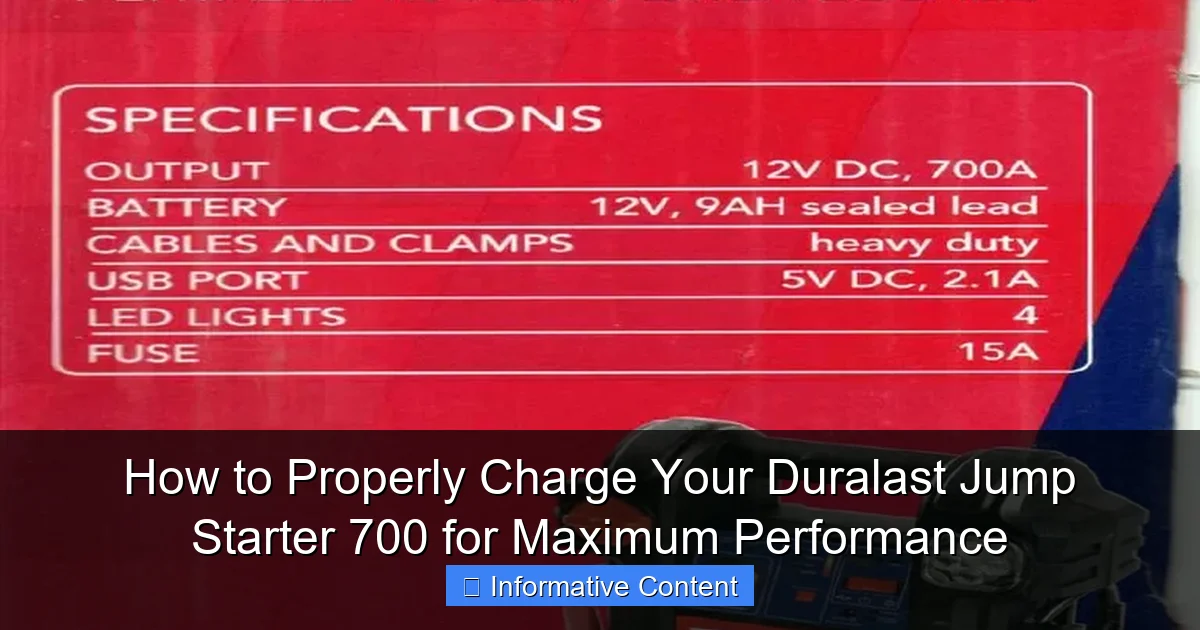
- Battery Capacity: The unit typically has a capacity of around 18,000mAh, which determines how much energy it can store.
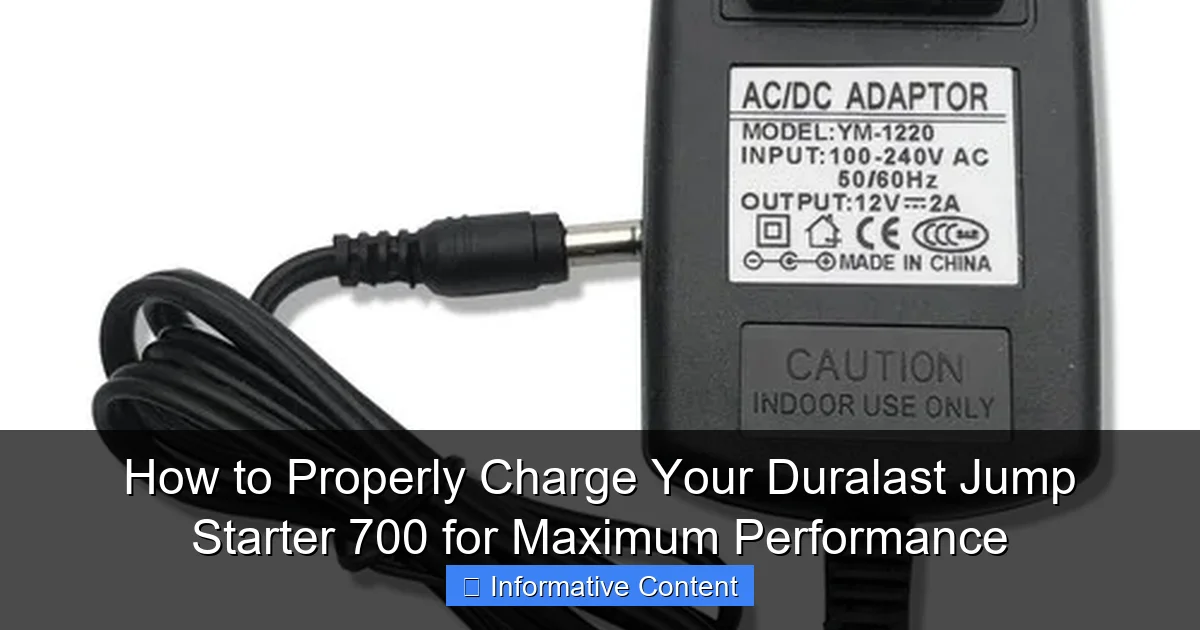
- Charging Port: It uses a standard DC input port (usually 12V) for charging, often with a included wall adapter or car charger.
- Charge Indicator Lights: Most models have LED lights that show the current charge level—green for full, red or blinking for low.
- Auto-Shutoff: To prevent overcharging, the device usually stops drawing power once fully charged.
Understanding these features helps you make informed decisions about when and how to charge your jump starter. For example, if the indicator lights show only one bar, it’s time to plug it in—even if you don’t plan to use it right away.
Step-by-Step Guide to Charging Your Duralast Jump Starter 700
Charging your Duralast Jump Starter 700 is simple, but doing it correctly ensures longevity and reliability. Here’s a clear, step-by-step process to follow every time.
Step 1: Check the Current Charge Level
Before plugging in, always check the charge status. Most Duralast Jump Starter 700 models have a button you can press to activate the LED indicator lights. These lights will show how much charge is left:
- 4 green lights = 100% charged
- 3 green lights = 75%
- 2 green lights = 50%
- 1 green light = 25%
- Red or blinking light = critically low (charge immediately)
If only one light is on or it’s blinking red, don’t wait—charge it right away. A deeply discharged lithium-ion battery can degrade faster over time.
Step 2: Choose the Right Charger
The Duralast Jump Starter 700 typically comes with a 12V DC wall charger. This is the safest and most reliable option for home use. Avoid using third-party chargers unless they’re specifically designed for lithium-ion jump starters and match the voltage and current requirements.
Some users also have the option to charge via a car’s 12V cigarette lighter socket using a compatible adapter. This is useful if you’re on the road and need to top up the charge, but it’s generally slower than wall charging.
Step 3: Connect the Charger
Plug the DC charger into the charging port on the jump starter. Make sure the connection is secure. You should see the indicator lights begin to flash or change color, signaling that charging has started.
Tip: Always charge in a dry, well-ventilated area. Avoid extreme temperatures—charging in freezing cold or direct sunlight can reduce battery efficiency and lifespan.
Step 4: Monitor the Charging Process
Charging time varies depending on the current battery level. On average, it takes about 3 to 4 hours to go from completely dead to fully charged. Here’s a rough estimate:
| Current Charge Level | Estimated Charging Time |
|---|---|
| 0% (completely dead) | 3.5–4 hours |
| 25% | 2.5–3 hours |
| 50% | 1.5–2 hours |
| 75% | 45 minutes–1 hour |
Don’t worry if it takes a little longer—lithium-ion batteries charge in stages, and the final 10–20% often takes the most time as the system slows down to protect the battery.
Step 5: Confirm Full Charge
Once charging is complete, the indicator lights should show all four green lights (or stay solid green, depending on the model). At this point, you can safely unplug the charger. The device is now ready to use.
Pro Tip: Even if you don’t plan to use the jump starter right away, it’s a good idea to charge it fully at least once every 3 months. This prevents deep discharge and keeps the battery chemistry healthy.
Best Practices for Maintaining Charge and Battery Health
Charging your Duralast Jump Starter 700 isn’t just about plugging it in when it’s dead. To get the most out of your device, you need to adopt habits that preserve battery health over time. Think of it like maintaining a smartphone—small, consistent actions make a big difference.
Charge Regularly, Even When Not in Use
One of the biggest mistakes people make is forgetting about their jump starter until they need it. Lithium-ion batteries don’t like to sit idle for long periods. If you leave your Duralast Jump Starter 700 in the garage for six months without charging, it could lose a significant amount of capacity—even if it was fully charged when stored.
To avoid this, make it a habit to check and charge your jump starter every 2–3 months. Set a reminder on your phone or calendar. A quick 30-minute top-up can keep the battery in optimal condition.
Avoid Deep Discharges
While the Duralast Jump Starter 700 is designed to handle occasional deep discharges, doing so regularly can shorten its lifespan. Try to recharge the unit when it drops below 50%—don’t wait until it’s completely dead.
For example, if you use it to jump-start your car on a Monday morning and the indicator shows two lights left, plug it in that evening. This keeps the battery in the “sweet spot” (20–80% charge), which is ideal for lithium-ion longevity.
Store in a Cool, Dry Place
Temperature plays a huge role in battery health. High heat accelerates chemical degradation, while extreme cold reduces performance. Store your jump starter in a climate-controlled environment—like a closet or garage shelf—rather than leaving it in a hot car trunk or freezing shed.
Ideal storage temperature: between 50°F and 77°F (10°C to 25°C). If you live in a very hot or cold climate, consider bringing the unit indoors during extreme weather.
Use the Built-In Features Wisely
The Duralast Jump Starter 700 often includes USB ports for charging phones, tablets, or other devices. While convenient, using these ports drains the internal battery. If you’ve used the USB ports heavily, make sure to recharge the unit afterward.
Also, the built-in flashlight is great in emergencies, but don’t leave it on for long periods unless necessary. Every bit of power used is power that needs to be replaced.
Keep It Clean and Protected
Dust, dirt, and moisture can affect the charging port and internal components. Wipe the unit with a dry cloth periodically, and avoid exposing it to water or humidity. If the charging port looks dirty, use a can of compressed air to gently clean it.
Consider storing the jump starter in its original case or a protective pouch to prevent scratches and damage.
Troubleshooting Common Charging Issues
Even with proper care, you might run into charging problems from time to time. Here are some common issues and how to fix them.
The Jump Starter Won’t Charge
If you plug in the charger and nothing happens—no lights, no response—there are a few possible causes:
- Faulty Charger: Try using a different 12V DC charger with the same specifications. If it works, your original charger may be damaged.
- Loose Connection: Check that the charging cable is fully inserted into the port. Sometimes dust or debris can block the connection.
- Dead Battery: In rare cases, the internal battery may have failed completely. If the unit is several years old and won’t hold a charge, it may need replacement.
Tip: If the unit has been stored for a long time, it might enter a “sleep mode” to protect the battery. Try pressing the power button for 10–15 seconds to wake it up before charging.
Charging Is Extremely Slow
If your Duralast Jump Starter 700 is taking much longer than usual to charge, consider these factors:
- Low-Quality Charger: Using a charger with insufficient output (e.g., less than 2A) can slow charging. Always use the recommended charger.
- High Ambient Temperature: Charging in hot conditions can cause the device to throttle charging speed to prevent overheating.
- Battery Aging: Over time, lithium-ion batteries lose capacity. If your unit is more than 3–4 years old, slower charging may be normal.
If slow charging persists, contact Duralast customer support for assistance.
Indicator Lights Are Confusing or Inconsistent
Some users report that the LED lights don’t always reflect the true charge level. This can happen if the battery management system (BMS) is out of sync.
To recalibrate the indicator:
- Fully charge the unit until all lights are green.
- Let it sit for 2–3 hours without use.
- Press the power button to check the lights again.
If the lights still seem inaccurate, a full discharge and recharge cycle (use it until dead, then charge fully) may help reset the system.
When to Replace Your Duralast Jump Starter 700
No battery lasts forever. The Duralast Jump Starter 700 is built to last, but with regular use, its performance will eventually decline. Here’s how to know when it’s time to replace it.
Signs of Battery Degradation
Watch for these red flags:
- The unit won’t hold a charge for more than a few days.
- It takes significantly longer to charge than before.
- It fails to jump-start a vehicle that it used to handle easily.
- The indicator lights behave erratically or don’t turn on at all.
If you notice any of these issues, the internal battery may be nearing the end of its life.
Expected Lifespan
Under normal use and proper maintenance, the Duralast Jump Starter 700 should last 3–5 years. Some users report even longer lifespans with careful handling. However, if you use it frequently—say, multiple times per month—the battery may degrade faster.
Keep in mind that lithium-ion batteries have a limited number of charge cycles (typically 300–500 full cycles). Once you’ve used up most of those, performance will drop noticeably.
Recycling and Disposal
When it’s time to replace your jump starter, don’t just toss it in the trash. Lithium-ion batteries contain hazardous materials and should be recycled properly. Many auto parts stores, electronics retailers, and municipal recycling centers accept old jump starters and batteries for safe disposal.
Check with your local waste management authority for guidelines on battery recycling in your area.
Final Thoughts: Keep Your Jump Starter Ready, Rain or Shine
Your Duralast Jump Starter 700 is more than just a backup tool—it’s peace of mind. Whether you’re facing a dead battery on a snowy morning or helping a friend whose car won’t start, having a fully charged, reliable jump starter can make all the difference.
But that reliability doesn’t happen by accident. It comes from understanding how the device works, charging it correctly, and maintaining it over time. By following the steps in this guide—checking charge levels, using the right charger, storing it properly, and troubleshooting issues early—you’ll extend the life of your jump starter and ensure it’s always ready when you need it.
So the next time you open your trunk and see that compact black box, don’t just assume it’s ready. Take a moment to check the lights, give it a quick charge if needed, and rest easy knowing you’re prepared for whatever the road throws your way. After all, the best jump starter isn’t the one with the highest amp rating—it’s the one that actually works when you need it most.
Frequently Asked Questions
How do I charge a Duralast Jump Starter 700 for the first time?
For the first charge, plug the included AC adapter into the jump starter’s input port and a wall outlet. Charge it fully for 12–14 hours to activate the battery and ensure optimal performance. Avoid interrupting the initial charge cycle.
What type of charger does the Duralast Jump Starter 700 use?
The Duralast Jump Starter 700 uses a standard 12V DC input charger (included) for wall outlets or a car adapter for portable charging. Always use the manufacturer-recommended charger to prevent damage.
How long does it take to fully charge the Duralast Jump Starter 700?
A full charge typically takes 12–14 hours using the AC adapter. Charging times may vary slightly depending on the power source and battery level, but never exceed 24 hours to avoid overcharging.
Can I use the Duralast Jump Starter 700 while it’s charging?
No, avoid using the jump starter during charging. This can overheat the unit, reduce battery lifespan, or trigger safety mechanisms. Always unplug it before use.
How often should I recharge my Duralast Jump Starter 700 when not in use?
Recharge every 3–6 months if stored unused. Lithium-ion batteries lose charge over time, and regular top-ups maintain capacity and readiness for emergencies.
Why is my Duralast Jump Starter 700 not holding a charge?
If the unit won’t hold a charge, check for damaged cables, a faulty outlet, or a deeply discharged battery. Try a reset by leaving it plugged in for 24 hours; if issues persist, contact customer support.