
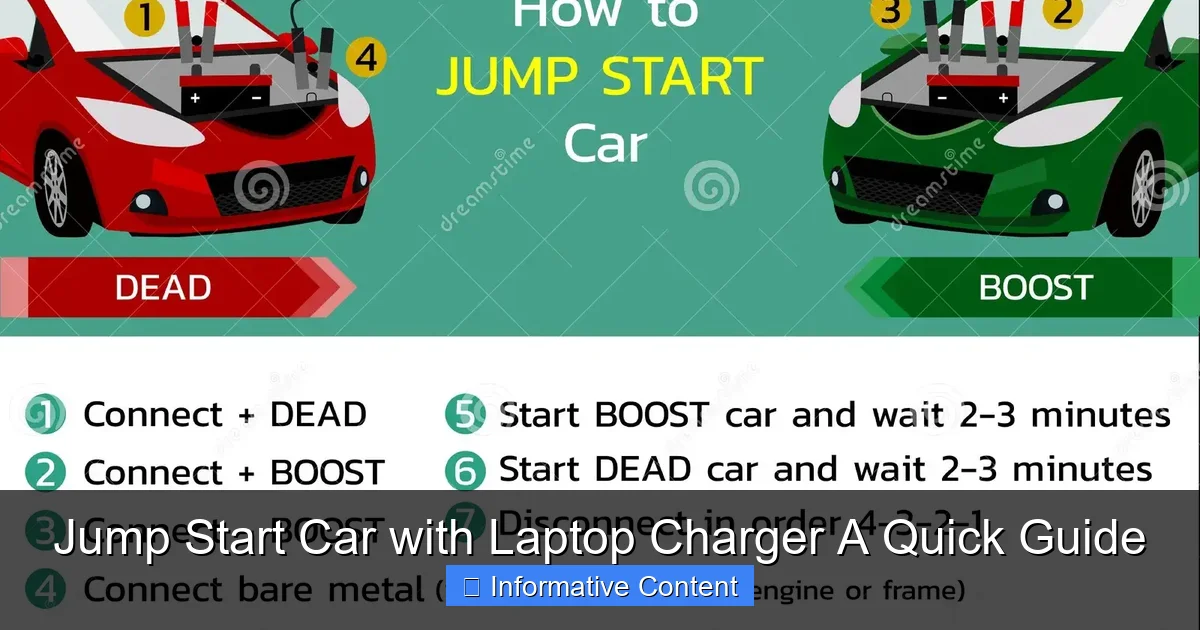
Featured image for jump start car with laptop charger
Image source: thumbs.dreamstime.com
Jump-starting a car with a laptop charger is not recommended and can be extremely dangerous. While the idea may seem like a clever hack in an emergency, laptop chargers lack the power and proper design to safely transfer energy to a car battery, risking damage to both devices and potential injury. Always use a proper jump starter or jumper cables with another vehicle for a safe and effective solution.
“`html
Key Takeaways
- Never use a laptop charger to jump start a car—it’s unsafe and ineffective.
- Car batteries require high current; laptop chargers lack the necessary power output.
- Use a proper jump starter or jumper cables for reliable, safe results.
- Check battery voltage first to confirm if a jump is needed.
- Portable lithium jump starters are compact, safe, and designed for emergencies.
- Always follow safety protocols to avoid sparks, damage, or injury.
📑 Table of Contents
- Jump Start Car with Laptop Charger A Quick Guide
- Understanding How Car Batteries and Laptop Chargers Work
- Can You Actually Jump-Start a Car with a Laptop Charger?
- The Risks and Dangers of Using a Laptop Charger to Jump-Start a Car
- Safer and More Effective Alternatives to Jump-Start Your Car
- When a Laptop Charger Might (Theoretically) Help—And Why It’s Still Not Recommended
- Conclusion: Stick to the Right Tools for the Job
Jump Start Car with Laptop Charger A Quick Guide
Picture this: It’s a cold Monday morning. You’re running late for work, coffee in hand, keys jingling in your pocket. You hop into your car, turn the key—and nothing. The engine doesn’t even sputter. Just a faint clicking sound. Your heart sinks. Dead battery. Again.
We’ve all been there. A dead car battery can turn a simple errand into a major headache. You might immediately think, “I need jumper cables and another car,” or worse, “I have to call a tow truck.” But what if I told you there’s a surprising alternative—one that might already be sitting in your backpack? Yes, we’re talking about your laptop charger. While it might sound like a wild idea, the concept of using a laptop charger to jump-start a car has sparked curiosity (and some debate) among drivers, tech enthusiasts, and DIYers alike.
In this guide, we’ll explore whether it’s actually possible to jump-start a car with a laptop charger, how it works (or doesn’t), the risks involved, and safer alternatives. Whether you’re stranded in a parking lot or just curious about emergency hacks, this post will give you the real facts—no fluff, no hype. Let’s dive in.
Understanding How Car Batteries and Laptop Chargers Work
Before we get into whether you can jump-start a car with a laptop charger, it’s important to understand what each device does and how they differ. At first glance, both a car battery and a laptop charger deal with electricity, but they operate in very different ways.

Visual guide about jump start car with laptop charger
Image source: m.media-amazon.com
How a Car Battery Powers Your Vehicle
A car battery is a 12-volt lead-acid battery designed to deliver a large burst of current to start the engine. When you turn the key, the battery sends power to the starter motor, which cranks the engine. Once the engine is running, the alternator takes over, recharging the battery and powering the car’s electrical systems.
- Voltage: Typically 12 volts (nominal)
- Current: Can deliver 200–600 amps during startup
- Capacity: Measured in amp-hours (Ah), usually 40–70 Ah
- Type: Lead-acid, with liquid electrolyte
Car batteries are built for high power output over short periods—perfect for starting an engine, but not ideal for long-term energy storage or low-power devices.
How a Laptop Charger Supplies Power
A laptop charger, on the other hand, is a power adapter that converts AC power from a wall outlet into DC power suitable for your laptop. Most laptop chargers output between 15 and 20 volts and deliver anywhere from 2 to 6 amps, depending on the model.
- Voltage: Usually 15–20 volts DC
- Current: Typically 2–6 amps
- Power Output: Ranges from 30 to 100 watts
- Type: Switching power supply (efficient, lightweight)
Laptop chargers are designed for steady, low-current delivery over long periods. They’re not built to handle sudden surges or high-power demands like starting a car engine.
Key Differences Between the Two
Now that we’ve covered the basics, let’s compare them side by side:
| Feature | Car Battery | Laptop Charger |
|---|---|---|
| Voltage | 12V DC | 15–20V DC |
| Current Output | 200–600A (peak) | 2–6A (continuous) |
| Power Delivery | High surge, short duration | Low surge, long duration |
| Energy Storage | Yes (stores energy) | No (converts AC to DC) |
| Primary Use | Starting engine, powering car systems | Charging laptop, powering electronics |
The main takeaway? A laptop charger doesn’t store energy like a battery. It only converts power from an outlet. So unless you’re plugging it into a wall socket, it can’t supply any power at all. That’s a critical point we’ll come back to.
Can You Actually Jump-Start a Car with a Laptop Charger?
This is the million-dollar question: Can you jump-start a car using a laptop charger? The short answer is: No, not directly. But let’s unpack why, and explore whether there’s any scenario where it might seem possible.
The Myth of the “Laptop Charger Jump Start”
You might have seen viral videos or forum posts claiming that someone “jump-started their car with a laptop charger.” These stories often go like this: “I connected my charger to the battery terminals, waited a few minutes, and the car started!” Sounds impressive, right?
But here’s the catch: The laptop charger wasn’t actually jump-starting the car. In most of these cases, the person was using the charger while it was still plugged into a wall outlet. That means the charger was drawing power from the electrical grid—not from the car battery or the charger itself.
In other words, they weren’t using the charger as a power source. They were using it as a bridge to deliver grid power to the car’s electrical system. This is a subtle but important distinction.
What Actually Happened in Those “Success” Stories?
Let’s break down a typical scenario:
- You have a dead car battery.
- You plug your laptop charger into a wall outlet.
- You connect the charger’s output wires (usually via alligator clips or makeshift connectors) to the car battery terminals.
- You wait a few minutes, then try to start the car.
- The car starts.
At first glance, it looks like the laptop charger revived the battery. But in reality, the charger was simply providing a small amount of current to “trickle charge” the battery—similar to how a battery maintainer works. However, this process is extremely slow and inefficient.
Most car batteries need at least 10–20 amps to recharge meaningfully. A laptop charger delivers only 2–6 amps—and that’s under ideal conditions. In practice, the actual current reaching the battery is even lower due to voltage mismatches, resistance, and safety features in the charger.
Why It’s Not a Reliable Solution
Even if you manage to get a tiny bit of charge into the battery, it’s unlikely to be enough to start the car—especially if the battery is completely dead. Here’s why:
- Insufficient Current: A dead battery needs a strong surge to overcome internal resistance. A laptop charger can’t provide that.
- Voltage Mismatch: Most laptop chargers output 15–20V, which is higher than a car battery’s 12V. This can damage the battery or the car’s electronics.
- No Energy Storage: The charger doesn’t store power. If you unplug it from the wall, it’s useless.
- Safety Risks: Connecting a charger directly to a car battery can cause sparks, overheating, or even explosion if done incorrectly.
In short, while it’s technically possible to use a laptop charger to deliver a tiny amount of charge to a car battery, it’s not a practical or safe method for jump-starting a vehicle.
The Risks and Dangers of Using a Laptop Charger to Jump-Start a Car
Now that we’ve established that using a laptop charger to jump-start a car isn’t effective, let’s talk about why it’s also dangerous. What starts as a clever hack can quickly turn into a safety hazard—or worse, a fire risk.
Electrical Hazards and Short Circuits
Car batteries are powerful devices. They can deliver hundreds of amps in an instant. If you accidentally short the terminals—say, by touching the positive and negative clips together—you can create a massive spark, melt metal, or even cause the battery to explode.
Adding a laptop charger into the mix increases the risk. Most chargers aren’t designed to handle the high currents or reverse polarity that can occur when connecting to a car battery. If the charger isn’t properly isolated or protected, it could fail catastrophically.
Overvoltage Damage to Electronics
Modern cars are packed with sensitive electronics: ECUs (engine control units), sensors, infotainment systems, and more. These components are designed to operate at 12 volts. Feeding them 15–20 volts from a laptop charger can fry circuits, corrupt software, or permanently damage the vehicle’s electrical system.
Even if the car starts, you might end up with a much bigger repair bill than if you’d just called a roadside assistance service.
Battery Damage and Reduced Lifespan
Lead-acid car batteries are built to be charged with specific voltage and current profiles. Charging them with the wrong voltage—especially higher than 14.4 volts—can cause overcharging, electrolyte loss, and plate corrosion.
Over time, this reduces the battery’s capacity and shortens its lifespan. In extreme cases, it can cause the battery to swell, leak, or rupture.
Fire and Thermal Runaway Risk
Laptop chargers aren’t built to handle the thermal stress of charging a car battery. If the charger overheats—due to prolonged use, poor ventilation, or a faulty connection—it can catch fire. The same goes for the battery itself if it’s overcharged or shorted.
Thermal runaway is a real danger with lithium-ion batteries (like those in laptops), but even lead-acid batteries can release flammable hydrogen gas when overcharged. A single spark near the battery can ignite it.
Real-World Example: A Cautionary Tale
Let’s say you’re in a parking garage with no jumper cables. You remember seeing a video where someone used a laptop charger to start their car. You try it—connecting the charger to the battery while it’s plugged into an outlet.
After 10 minutes, nothing happens. You check the connections. As you touch the clips, a spark flies. The charger starts smoking. You unplug it quickly, but the damage is done—the charger is fried, and your battery might be compromised.
Now you’re not only stranded, but you’ve also damaged your equipment. This isn’t hypothetical. Similar incidents have been reported on forums and social media.
The bottom line? The risks far outweigh any potential benefit. It’s not worth endangering yourself, your car, or your equipment for a slim chance of getting a few extra volts into a dead battery.
Safer and More Effective Alternatives to Jump-Start Your Car
If using a laptop charger isn’t the answer, what should you do when your car won’t start? The good news is, there are several safer, more reliable alternatives. Let’s explore the best options.
1. Traditional Jumper Cables and a Helper Vehicle
This is the classic method—and for good reason. It’s fast, effective, and widely available.
How it works: You connect your dead battery to a working battery in another car using jumper cables. The healthy battery supplies the current needed to start your engine.
Steps:
- Park the working car close (but not touching) your vehicle.
- Turn off both engines and engage the parking brakes.
- Connect the red (positive) clamp to the dead battery’s positive terminal.
- Connect the other red clamp to the working battery’s positive terminal.
- Connect the black (negative) clamp to the working battery’s negative terminal.
- Connect the other black clamp to an unpainted metal surface on your car (not the battery)—this reduces sparking.
- Start the working car and let it run for a few minutes.
- Try starting your car. If it starts, leave it running and disconnect the cables in reverse order.
Tip: Always keep a set of jumper cables in your trunk. They’re inexpensive (usually $20–$40) and can save you hours of frustration.
2. Portable Jump Starter (Jump Box)
A portable jump starter is a compact, battery-powered device that can jump-start your car without another vehicle. It’s like having a spare battery in a box.
Advantages:
- No need for another car
- Built-in safety features (reverse polarity protection, overload protection)
- Often includes USB ports, flashlights, and air compressors
- Rechargeable via wall outlet or car charger
How to use:
- Turn off the car and connect the jump starter’s clamps to the battery terminals (red to positive, black to negative).
- Turn on the jump starter.
- Wait a few seconds, then try starting the car.
- Once the engine is running, disconnect the clamps.
Tip: Look for a jump starter with at least 1000 peak amps for most cars. Popular brands include NOCO, DBPOWER, and Tacklife.
3. Call for Roadside Assistance
If you’re not comfortable handling jumper cables or don’t have a jump starter, calling for help is always a smart move.
Many auto insurance plans, AAA memberships, and car warranties include free roadside assistance. A professional technician can safely jump-start your car, test the battery, and even tow you if needed.
When to call:
- You’re in an unsafe location (e.g., highway, dark area)
- You don’t have jumper cables or a jump starter
- You’re unsure how to safely connect the cables
- The battery is old or visibly damaged
4. Preventative Maintenance: Avoid Dead Batteries Altogether
The best way to deal with a dead battery is to avoid it in the first place. Here are some tips:
- Check your battery regularly: Most batteries last 3–5 years. Have it tested during routine maintenance.
- Turn off lights and accessories: Leaving headlights, interior lights, or the radio on can drain the battery overnight.
- Use a battery maintainer: If you don’t drive often, a trickle charger can keep the battery charged.
- Keep terminals clean: Corrosion can prevent proper charging. Clean terminals with a baking soda and water solution.
By taking these steps, you can reduce the chances of being stranded with a dead battery.
When a Laptop Charger Might (Theoretically) Help—And Why It’s Still Not Recommended
We’ve been pretty clear: using a laptop charger to jump-start a car isn’t safe or effective. But let’s play devil’s advocate for a moment. Are there any scenarios where it might seem to work?
The “Trickle Charge” Scenario
Suppose your battery isn’t completely dead—just weak. Maybe the lights were left on for a few hours, and the battery voltage dropped to 11 volts. In this case, a laptop charger might deliver a small amount of current if connected properly and left for a long time (hours, not minutes).
But even then, the process is extremely slow. A 60-watt laptop charger delivering 5 amps at 12 volts would take over 10 hours to add just 50 amp-hours of charge—assuming 100% efficiency, which isn’t realistic.
And remember: you’d need to keep the charger plugged into a wall outlet the entire time. If the power goes out, you’re back to square one.
Using a Modified Setup (Not Recommended)
Some tech-savvy individuals have experimented with using a laptop charger in conjunction with a DC-DC converter or a capacitor bank to step up voltage or store energy. While theoretically possible, these setups are complex, expensive, and still carry significant risks.
They require electrical expertise, proper insulation, and safety testing. For the average driver, it’s far easier and safer to use a portable jump starter.
Why It’s Still a Bad Idea
Even in the best-case scenario, using a laptop charger to charge a car battery is:
- Inefficient: Takes too long to make a difference
- Unreliable: Depends on external power and proper connections
- Risky: Can damage electronics or cause fires
- Unnecessary: Better tools exist for the job
Save the laptop charger for your laptop. Your car deserves better.
Conclusion: Stick to the Right Tools for the Job
So, can you jump-start a car with a laptop charger? The answer is a firm no—at least not in any practical or safe way. While the idea might seem clever, the reality is that laptop chargers aren’t designed for this purpose. They lack the power, storage, and safety features needed to revive a dead car battery.
Instead of risking damage to your car, your equipment, or yourself, opt for proven solutions: jumper cables, a portable jump starter, or roadside assistance. These tools are affordable, reliable, and built specifically for the job.
Remember, a little preparation goes a long way. Keep a jump starter in your car, check your battery regularly, and know how to use jumper cables safely. That way, the next time you turn the key and hear that dreaded click, you’ll be ready—no laptop charger required.
Stay safe, stay charged, and happy driving!
“`
Frequently Asked Questions
Can I jump start a car with a laptop charger?
While technically possible in emergencies, using a laptop charger to jump start a car is not recommended. Laptop chargers lack the high current output (typically 12V/20A+) needed for most car batteries and may damage sensitive electronics.
What type of laptop charger can jump start a car?
Only high-wattage USB-C chargers (100W+) with Power Delivery (PD) *might* work for small engines, but success varies. Even then, this method risks overheating the charger or failing to provide sufficient amperage for reliable jump starting.
Is it safe to jump start car with laptop charger?
No, it poses significant safety risks. Laptop chargers aren’t designed for automotive use, which can lead to overheating, short circuits, or battery damage. Always use a proper jump starter or jumper cables for safety.
How do you jump start a car with a laptop charger step-by-step?
First, ensure your laptop charger supports USB-C PD and the car battery accepts 12V input. Connect the charger to the battery terminals *only if compatible*—but note: most modern cars have complex electrical systems that make this impractical.
Why won’t my laptop charger jump start my car?
Most laptop chargers max out at 20V/5A, while car batteries require 12V/100A+ for cranking. Even if voltage matches, the current is insufficient, making the attempt futile without specialized equipment.
Are there safer alternatives to jump starting with a laptop charger?
Yes! Use portable lithium jump starters (with 12V/24V modes) or traditional jumper cables. These deliver the correct amperage safely and are designed specifically for automotive battery recovery.