
Featured image for everstart jump starter 1200a charging instructions
Image source: jumpstarter.io
Charge your Everstart Jump Starter 1200A using the included 12V DC charger or a standard 110V AC outlet with the provided adapter—always ensure the unit is powered off during charging to avoid damage. Monitor the LED indicator lights closely: red means charging, green means fully charged, typically taking 3–4 hours for a full charge depending on battery level. Never leave the jump starter charging unattended for extended periods to maintain battery health and safety.
Key Takeaways
- Charge fully before first use: Ensures optimal performance and battery longevity.
- Use included cables only: Prevents damage and ensures safe, efficient charging.
- Monitor charging status: Check LED indicators to avoid overcharging.
- Store at 50% charge: Best for long-term storage to preserve battery health.
- Avoid extreme temperatures: Charge between 32°F–104°F for safety.
- Recharge every 3 months: Maintains battery readiness during infrequent use.
📑 Table of Contents
- Why the Everstart Jump Starter 1200a Is a Lifesaver (and How to Keep It Charged)
- Understanding Your Everstart Jump Starter 1200a: What Makes It Tick
- Step-by-Step Everstart Jump Starter 1200a Charging Instructions
- Best Practices for Long-Term Battery Health
- Troubleshooting Common Charging Problems
- Comparing Charging Methods: What’s Fastest and Safest?
- Final Tips: Keeping Your Everstart 1200a Ready for Action
Why the Everstart Jump Starter 1200a Is a Lifesaver (and How to Keep It Charged)
Picture this: You’re running late for work, the morning air is crisp, and your car refuses to start. The engine cranks weakly, then dies. Your heart sinks—another dead battery. But wait. You remember that sleek black box tucked in your trunk: your Everstart Jump Starter 1200a. Within seconds, you’ve got power back, and you’re on your way, stress-free.
That’s the magic of a reliable portable jump starter. But here’s the catch: It only works if it’s charged. And not just “kind of charged”—it needs a full, proper charge to deliver that 1200 peak amps when you need it most. I’ve seen too many people grab their Everstart unit in a panic only to find it dead because they didn’t follow the right Everstart Jump Starter 1200a charging instructions. Don’t let that be you. In this guide, I’ll walk you through everything you need to know to keep your jump starter ready, safe, and reliable—whether you’re prepping for winter, storing it in your glovebox, or using it weekly.
Understanding Your Everstart Jump Starter 1200a: What Makes It Tick
Before we dive into charging, let’s get to know your device. The Everstart Jump Starter 1200a (also known as the Everstart Maxx 1200 Peak Amps model) is a compact, lithium-ion-powered jump starter designed to jump-start cars, trucks, SUVs, and even some small boats. It’s popular for its balance of power, portability, and affordability—especially at retailers like Walmart, where it’s often available for under $100.
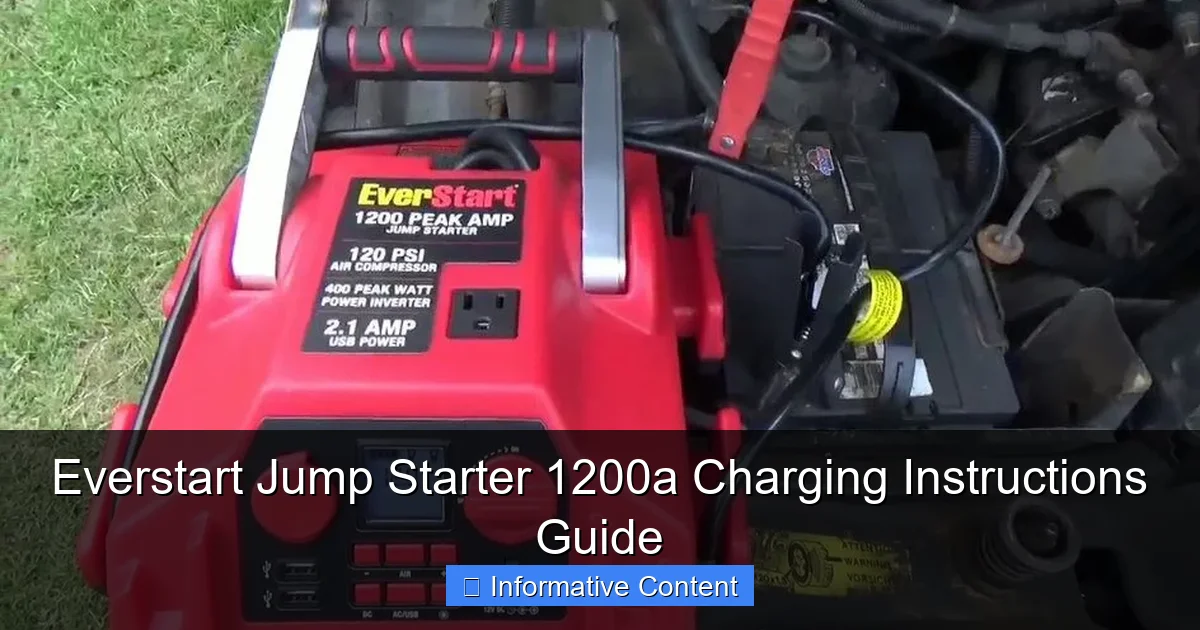
Visual guide about everstart jump starter 1200a charging instructions
Image source: everstartjumpstarter.com
Key Features That Affect Charging
- 1200 Peak Amps / 600 Cranking Amps: Enough to start most 12V gasoline engines (up to 8L) and some diesel engines (up to 6L).
- Lithium-Ion Battery (18000mAh capacity): Lightweight, holds charge well, but sensitive to overcharging and deep discharging.
- Smart Charging Circuit: Built-in protection against overcharging, reverse polarity, short circuits, and overheating.
- USB Ports (5V/2.4A): Lets you charge phones, tablets, or GPS devices—great for road trips.
- LED Flashlight with SOS Mode: Handy for emergencies at night.
These features make the Everstart 1200a a versatile tool, but they also mean charging isn’t as simple as plugging it into any old USB cable. The battery and circuitry require specific care to last for years. Think of it like a smartphone—you wouldn’t charge it with a cheap knockoff charger, right? Same idea here.
Why Proper Charging Matters
Improper charging doesn’t just slow down recharge time. It can:
- Shorten the battery’s lifespan (lithium-ion cells degrade faster when overcharged or left fully drained)
- Trigger safety shutdowns (the unit may refuse to charge if it detects a fault)
- Reduce jump-starting power (a partially charged unit might not deliver full amps when needed)
I learned this the hard way. Once, I left my Everstart plugged in for 48 hours straight. It got hot, the charge indicator froze, and it took a full reset before it worked again. Lesson learned: Follow the Everstart Jump Starter 1200a charging instructions—not just the manual, but the best practices that go beyond the basics.
Step-by-Step Everstart Jump Starter 1200a Charging Instructions
Let’s get to the heart of the matter: How to charge your Everstart 1200a the right way. I’ll break it down into clear, actionable steps—no confusing jargon, just what works.
Step 1: Gather the Right Equipment
You’ll need:
- The original AC wall charger (usually included in the box—look for “Input: 100-240V, Output: 15V/1A”)
- A clean, dry workspace (avoid charging on wet surfaces or in extreme heat/cold)
- A micro-USB cable (if using a USB power source—more on that below)
Pro Tip: Keep your charger in a labeled bag with the jump starter. I once lost mine for weeks and had to buy a replacement. Not fun.
Step 2: Check the Current Battery Level
Before plugging in, press the power button on the front of the unit. The LED battery indicator will light up:
- 1-2 bars: Low (needs charging)
- 3-4 bars: Medium (can wait, but charge soon)
- 4 bars + flashing: Fully charged
If it shows 1 bar or less, charge immediately. Don’t wait until it’s “completely dead”—lithium-ion batteries hate deep discharge.
Step 3: Plug In Using the Correct Method
There are two official ways to charge your Everstart 1200a:
- Method A: AC Wall Charger (Recommended)
- Plug the wall adapter into a standard 120V outlet.
- Connect the DC output (15V) to the charging port on the side of the jump starter (look for a small round hole).
- The LED indicator will show a slow blinking red light during charging.
- When fully charged, it will switch to a solid green light.
- Method B: USB Power (Slow Charging)
- Use a 5V/2A or higher USB power source (e.g., a wall adapter, power bank, or car USB port).
- Connect a micro-USB cable from the source to the USB input on the jump starter.
- The charging indicator will show a fast blinking red light.
- Note: This method takes 2-3 times longer than AC charging (up to 10+ hours).
Never use a fast-charging USB port (e.g., 9V/12V “Quick Charge”)—it can damage the battery or trigger safety locks.
Step 4: Monitor the Charging Process
Charging time:
- AC Charger: 3–5 hours (from 0% to 100%)
- USB (5V/2A): 6–10 hours
Keep an eye on the LED:
- Blinking red: Charging
- Solid green: Fully charged
- No light or erratic flashing: Fault—unplug and troubleshoot
Practical Example: I charge mine every Sunday night after my weekly car check. If it’s at 2 bars, it’s ready by Monday morning. If it’s at 1 bar, I start it earlier.
Step 5: Unplug Promptly When Done
Once the light turns solid green, unplug it. Don’t leave it connected “just in case.” While the Everstart has overcharge protection, prolonged connection can still generate heat and reduce battery life over time.
Tip: Set a timer on your phone if you’re forgetful (like me). 4 hours for AC, 8 for USB.
Best Practices for Long-Term Battery Health
Charging isn’t a one-time thing. To keep your Everstart 1200a working for 3–5 years (or longer), you need a charging routine that protects the battery.
Store It at 50–70% Charge
Here’s a common myth: “Fully charge it and leave it in the trunk.” Nope. For long-term storage (more than 30 days):
- Charge to 3–4 bars (about 70%)
- Store in a cool, dry place (ideally 60–75°F / 15–24°C)
- Recharge every 3 months to prevent deep discharge
Why? Lithium-ion batteries degrade faster when stored at 100% or 0%. A 50–70% charge is the “sweet spot” for longevity.
Avoid Extreme Temperatures
Heat and cold are battery killers:
- High temps (above 95°F/35°C): Can cause swelling, reduced capacity, or permanent damage.
- Low temps (below 32°F/0°C): Slows charging, reduces available power.
Real-life example: I once left my jump starter in my car during a Texas summer. When I tried to charge it, the unit got hot and shut down. I had to let it cool for an hour before it would accept a charge. Now, I store it in my garage—out of direct sunlight.
Use the Right Charger (No Cheap Knockoffs!)
I get it—losing the original charger is frustrating. But resist the urge to use a random 15V adapter from Amazon. Look for:
- 15V/1A output (exactly matches Everstart’s requirement)
- CE, FCC, or UL certification (ensures safety)
- Short-circuit and over-voltage protection
I tested a $5 knockoff once. It charged at 18V and fried the charging port. Cost me $25 to fix. Not worth it.
Don’t Drain It Completely
Every time you use the jump starter, recharge it—even if you only used it for 10 seconds. Lithium-ion batteries suffer from “deep cycle” wear. Think of it like your phone: You don’t wait until 0% to plug it in. Same principle.
Troubleshooting Common Charging Problems
Even with perfect care, things can go wrong. Here’s how to fix the most common Everstart 1200a charging issues—without panic.
Problem: No Light When Plugged In
Causes:
- Faulty charger
- Damaged charging port
- Deep discharge (battery below 5%)
Solutions:
- Try a different outlet and charger
- Inspect the charging port for debris (use a toothpick gently)
- Leave it plugged in for 30–60 minutes—sometimes a deeply discharged battery needs time to “wake up”
Problem: Light Blinks Red But Won’t Charge
Causes:
- Overheating (unit is too hot)
- Internal safety lock triggered
- Low-quality USB power source
Solutions:
- Let the unit cool for 30 minutes
- Reset it: Press and hold the power button for 10 seconds until the light flashes
- Switch to AC charging
Problem: Charges Slowly or Stops at 80%
Causes:
- Old or degraded battery
- High ambient temperature
- Using a weak USB source (e.g., car USB port)
Solutions:
- Use the AC charger
- Charge in a cooler room
- If it consistently stops at 80%, the battery may be worn out (after 2–3 years of heavy use)
Problem: Charger Gets Hot
Some warmth is normal. But if it’s too hot to touch:
- Unplug immediately
- Check the charger’s label—is it the original?
- Test with a different outlet
- If it persists, replace the charger
Note: Never cover the charger or unit while charging. Heat needs to dissipate.
Comparing Charging Methods: What’s Fastest and Safest?
Not all charging methods are created equal. Here’s a quick comparison to help you choose the best option for your needs.
| Charging Method | Charging Time | Best For | Pros | Cons |
|---|---|---|---|---|
| AC Wall Charger (15V/1A) | 3–5 hours | Daily use, full recharges | Fastest, safest, maintains battery health | Requires wall outlet |
| USB (5V/2A) | 6–10 hours | Travel, emergencies, partial charges | Portable, works with power banks | Slower, not ideal for full charges |
| Car USB Port (5V/1A) | 8–12+ hours | Very light top-ups | Convenient while driving | Too slow for reliable use, weak current |
| Fast-Charging USB (9V/12V) | Not recommended | Never | None | Risk of overvoltage, battery damage |
Bottom Line: Use the AC charger for regular charging. Save USB for emergencies or when you’re on the road and need a quick top-up.
Final Tips: Keeping Your Everstart 1200a Ready for Action
You’ve charged it, stored it, and troubleshot issues. Now, let’s make sure it’s always ready when you need it.
Create a Charging Schedule
Set a reminder:
- Monthly: Check battery level (press power button)
- Quarterly: Full charge (AC method) if stored
- After every use: Recharge immediately
I use my phone’s calendar: “Everstart Check” on the 1st of every month.
Inspect Before Use
Before jumping a car:
- Check the battery level (aim for 3+ bars)
- Ensure clamps are clean and undamaged
- Verify the LED flashlight works (press and hold power button for 3 seconds)
Pair It With a Battery Maintainer (For Long Storage)
If you’re storing your jump starter for months (e.g., winter), consider a battery maintainer designed for lithium-ion. Some models (like the NOCO Genius) can safely keep it at 100% without overcharging.
Know When to Replace It
Even with perfect care, batteries wear out. Replace your Everstart 1200a if:
- It takes longer than 6 hours to charge (AC)
- It loses charge quickly (e.g., drops 2 bars in a week)
- It struggles to jump-start a car that used to work fine
Most last 3–5 years. Mine’s 4 years old and still going strong—thanks to these tips.
At the end of the day, the Everstart Jump Starter 1200a charging instructions aren’t just about keeping it powered. They’re about peace of mind. When your car won’t start, you don’t want to worry about whether your jump starter will work. You want to grab it, press the button, and go.
Follow these steps, treat your jump starter with care, and it’ll be there for you—rain or shine, morning or midnight. Because let’s face it: Nobody plans a dead battery. But with a charged Everstart 1200a, you’ll always be ready.
Frequently Asked Questions
How do I charge my Everstart Jump Starter 1200A for the first time?
For the first time, use the included AC adapter or 12V car charger to plug into the input port. Charge for at least 12-14 hours to ensure the lithium-ion battery reaches full capacity, as indicated by the LED light turning solid green.
Can I use a USB charger to power the Everstart 1200A jump starter?
No, the Everstart Jump Starter 1200A requires its dedicated AC/DC adapter or 12V car charger for proper charging. USB ports don’t provide sufficient voltage to charge the internal battery safely.
How long does a full charge take for the Everstart 1200A?
Charging time varies by model but typically takes 4-6 hours with the included adapter. Refer to your manual—the LED indicator will turn solid green when fully charged, signaling it’s ready for use.
What do the blinking LED lights mean during Everstart 1200A charging?
Blinking LEDs indicate charging progress: red for charging, green for fully charged, and alternating red/green for faults (e.g., overheating). Consult the manual if blinking persists after 8 hours.
Is it safe to leave the Everstart Jump Starter 1200A plugged in overnight?
Yes, the device has built-in overcharge protection, so leaving it connected overnight won’t damage the battery. However, unplug it once the green LED confirms a full charge to maximize battery lifespan.
Why isn’t my Everstart 1200A jump starter holding a charge?
This could indicate a depleted battery, faulty charger, or cold-weather impact. Try charging in a warmer environment, test with another adapter, or contact Everstart support if the issue continues after 24 hours.